View Demo Download Files
CSS
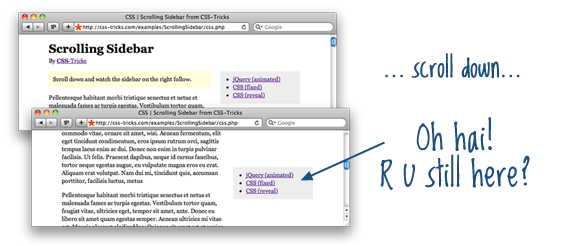
The easiest way to handle this is just to use CSS fixed positioning. Our sidebar is within a #page-wrap div with relative positioning, so the sidebar will set inside there, then we just push it over into place with margin.#page-wrap {
width: 600px;
margin: 15px auto;
position: relative;
}
#sidebar {
width: 190px;
position: fixed;
margin-left: 410px;
}jQuery
If we use JavaScript, we can measure how far down the window the user has scrolled after a window.scroll event. If that distance is further than the starting top position of the sidebar, we can adjust the top margin of the sidebar to push it down into visible range.Optimized by Doug Neiner:
$(function() {

    var $sidebar   = $("#sidebar"),
        $window    = $(window),
        offset     = $sidebar.offset(),
        topPadding = 15;

    $window.scroll(function() {
        if ($window.scrollTop() > offset.top) {
            $sidebar.stop().animate({
                marginTop: $window.scrollTop() - offset.top + topPadding
            });
        } else {
            $sidebar.stop().animate({
                marginTop: 0
            });
        }
    });

});Bonus "reveal" technique
On Tim Van Damme's Maxvoltar.com individual blog posts have a special sidebar with a fun "reveal" effect when the page is scrolled down.
The trick is to have a header area with a solid background sit on top of the sidebar, which is pulled up underneath it. You could use negative top margin to do it or adjust the top positioning value. Then an alpha transparent white-fade image is carefully placed at the top of the sidebar, and also z-index'd above it. So when the top of the sidebar, hidden by the header, slides down into view the white-fade image "reveals" it.
/* Negative top margin on sidebar pulls up header under title-area */
#sidebar {
  width: 190px;
  position: fixed;
  margin: -135px 0 0 410px;
}

/* Title area kept above all with z-index */
#title-area {
  background: white;
  position: relative;
  z-index: 3000;
}

/* white-fade image */
#reveal {
  position: absolute;
  right: 0;
  bottom: -20px;
}

No comments:
Post a Comment